LCD Projectors
PT-VMQ85
Smooth and Detailed 4K Images from the Smallest, Lightest LCD Projector in Its Class.
Key features of PT-VMQ85
Key features
| Bright, High-Contrast Detail in Any Space |
| Easy to Handle with Flexible Installation |
| Energy-Efficient, Eco-Conscious Design |


| PT-VMQ85 Series | |||
| Models | PT-VMQ85 | PT-VMQ75 | PT-VMQ65 |
| Light Output | 8,000 lm1 / 8,000 lm (ANSI)2 / 8,400 lm (Center)3 | 7,300 lm1 / 7,300 lm (ANSI)2 / 7,600 lm (Center)3 | 6,500 lm1 / 6,500 lm (ANSI)2 / 6,800 lm (Center)3 |
| Resolution | 4K (3840 x 2400 pixels)4 | ||
1 Measured when [PICTURE MODE] is set to [DYNAMIC], [LIGHT POWER] is set to [NORMAL], [DAYLIGHT VIEW] is set to [OFF], and [AUTO POWER SAVE] is set to [OFF]. Measurement, measuring conditions, and notation method comply with ISO/IEC 21118: 2020 international standards. Value is the average of all products when shipped.
2 Measured when [PICTURE MODE] is set to [DYNAMIC], [LIGHT POWER] is set to [NORMAL], [DAYLIGHT VIEW] is set to [OFF], and [AUTO POWER SAVE] is set to [OFF]. Measurement, measuring conditions, and method of notation all comply with American National Standards Institute standards. Value is the average of all products when shipped.
3 Average light-output value of all shipped products measured at the center of the screen in NORMAL Mode.
4 Displayed resolution 4K (3840 x 2400 pixels) with Quad Pixel Drive [ON].
5 YPBPR 4:2:0 format only for 4K/60p signals input via DIGITAL LINK.
6 Requires the AJ-WM50 Series Wireless Module (sold separately). Availability may vary by country or region.
7 As of June 2026, based on internal research, the PT-VMQ85 is the smallest and lightest 4K LCD projector with over 8,000 lm, and the PT-VMQ75 is the smallest and lightest with over 7,300 lm.
8 Settings cannot be made when [PICTURE] menu → [DAYLIGHT VIEW] is set to [AUTO], [DYNAMIC CONTRAST] is set to anything other than [OFF], [ECO MANAGEMENT] → [AUTO POWER SAVE] is set to [OFF], [ECO MANAGEMENT] → [LIGHT POWER] is set to anything other than [NORMAL], a [TEST PATTERN] is displayed, or there is no signal. Image Detection function is supported when the input signal is transmitted via HDMI™ terminal.
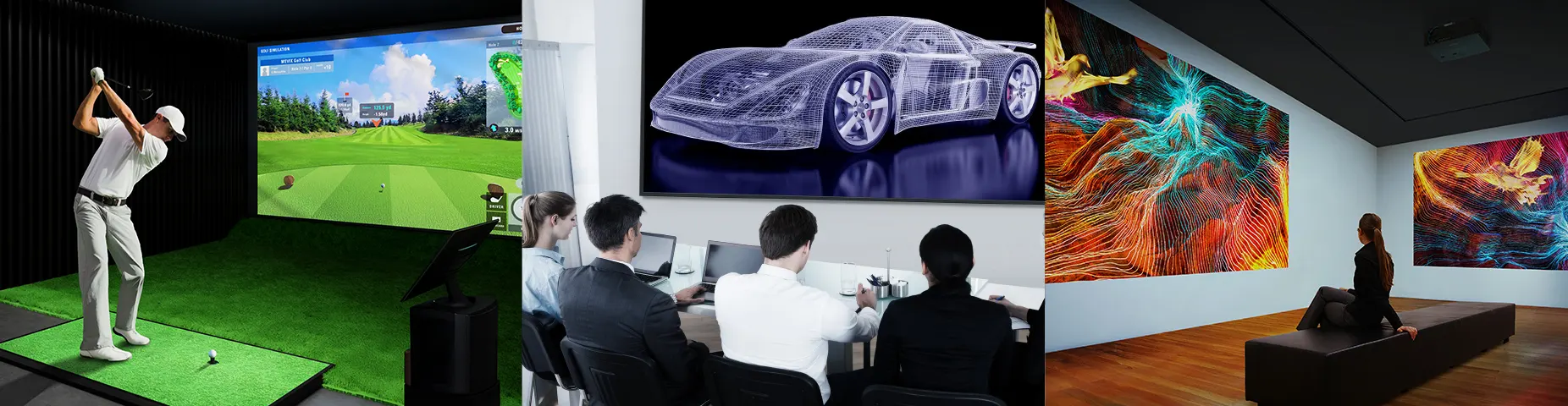
Making Immersive 4K Visuals More Accessible
The VMQ85 Series brings smooth, high-resolution projection within reach of more diverse applications, delivering Panasonic’s first
4K LCD visuals from the smallest and lightest platform in its class. Quad Pixel Drive 2-axis pixel-shifting technology and high brightness reveal crisp detail in well-lit spaces—from offices and classrooms to museums and sports simulators. Flexible installation, screen adjustment, and integration simplify setup, while efficient design streamlines daily operation.
Note: As of June 2026, based on internal research, the PT-VMQ85 is the smallest and lightest 4K LCD projector with over 8,000 lm, and the PT-VMQ75 is the smallest and lightest with over 7,300 lm. Displayed resolution 4K (3840 x 2400 pixels) with Quad Pixel Drive [ON].
Bright, High-Contrast Detail in Any Space

Quad Pixel Drive 2-Axis Pixel-Shifting Technology
Introduced for the first time on an LCD projector, Quad Pixel Drive enhances image precision by shifting pixels in both vertical and horizontal directions, increasing on-screen pixel density beyond conventional 1-axis systems. High-speed processing minimizes visible structure and gridding for smooth, detailed reproduction, ideal for technical drawings, digital art, museum displays, and XR simulation.
Note: Displayed resolution 4K (3840 x 2400 pixels) with Quad Pixel Drive [ON].

Up to 8,000 lm from a Compact Footprint
The VMQ85 Series delivers up to 8,000 lm from a compact, lightweight design, producing clear, vibrant visuals in well-lit spaces. Easy to carry and install, the projector supports efficient single-person setup and brings high-impact visuals to areas with limited installation space.
Note: Brightness measured when [PICTURE MODE] is set to [DYNAMIC], [LIGHT POWER] is set to [NORMAL], [DAYLIGHT VIEW] is set to [OFF], and [AUTO POWER SAVE] is set to [OFF]. Measurement, measuring conditions, and notation method comply with ISO/IEC 21118: 2020 international standards. Value is the average of all products when shipped. As of June 2026, based on internal research, the PT-VMQ85 is the smallest and lightest 4K LCD projector with over 8,000 lm, and the PT-VMQ75 is the smallest and lightest with over 7,300 lm. Displayed resolution 4K (3840 x 2400 pixels) with Quad Pixel Drive [ON]. Dimensions are with feet retracted, excluding protruding parts.

High 5,000,000:1 Dynamic Contrast
Scene-linking modulation analyzes content frame by frame to precisely adjust light output, delivering optimal contrast in every scene. It accurately reproduces rapidly changing bright and dark content while operating more efficiently than conventional systems, with optimization to suit content or ambient lighting. Enjoy enhanced detail in shadows, deeper blacks, brighter whites, and more natural skin tones for a stronger sense of depth and realism.
Note: Contrast ratio measured Full On/Full Off, when [PICTURE MODE] is set to [DYNAMIC] and [DYNAMIC CONTRAST] is set to [1]. Measurement, measuring conditions, and method of notation all comply with ISO/IEC 21118: 2020 international standards. Value is the average of all products when shipped.
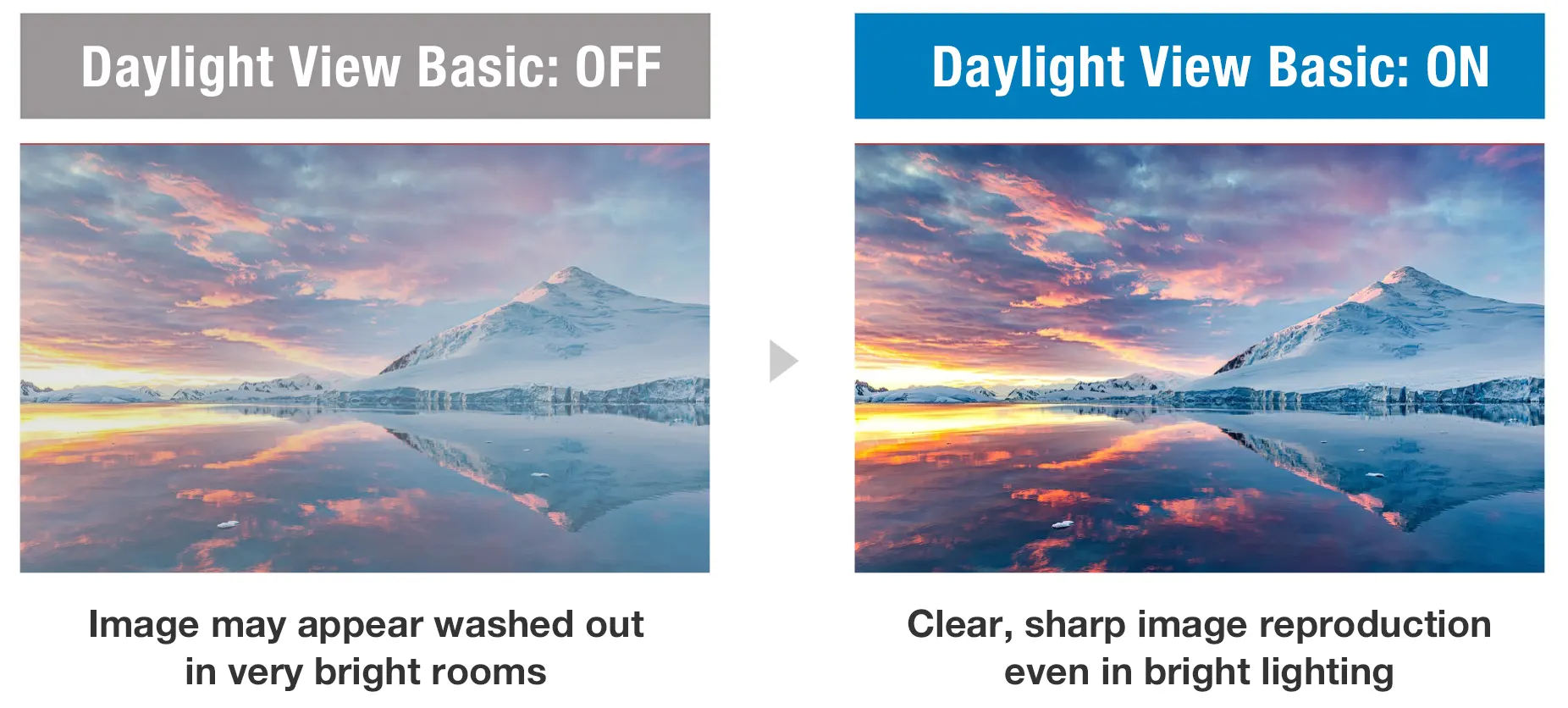
Clearer Visuals in Bright Spaces
Daylight View Basic uses a sensor to measure ambient light levels in your room and adjusts sharpness, halftone color, contrast, and brightness to optimize image visibility regardless of the room lighting. The result is a clearer, more detailed image, even in challenging conditions.

Vivid Green Mode for Sports Simulation
Vivid Green Mode enhances green tones for brighter, more natural-looking images—ideal for golf and other sports simulations. By adjusting signal gain and optimizing color balance, this mode delivers deeper greens and brighter midtones for a more engaging viewing experience.
Supports Widescreen 21:9 Video
Display widescreen content, such as 21:9 video conferencing layouts, at its original aspect ratio. The faces of remote participants can be aligned at eye level with in-room attendees, improving communication and engagement during meetings or classes.
Easy to Handle with Flexible Installation

Flexibility to Fit Your Space
Maximize screen area in almost any space, with 100-inch image projection from just 2.35 m (7.71 ft)—ideal for smaller sized rooms. A 1.6x optical zoom and wide lens shift make it easy to avoid ceiling obstructions or align the image from an existing mount, while Digital Zoom Extender enables reuse of ceiling mounts when positioned beyond the optical throw distance.
Note: Image is not to scale. Resolution decreases when using Digital Zoom Extender and Digital Image Shift. When using Digital Zoom Extender, the image reduction rate can be adjusted up to 80%. If set below 100%, the image position can be shifted vertically or horizontally using Digital Image Shift. Some screen correction functions are unavailable when using this function, and the range of corner adjustment is limited. Using the same projector mount may not be possible in every situation.
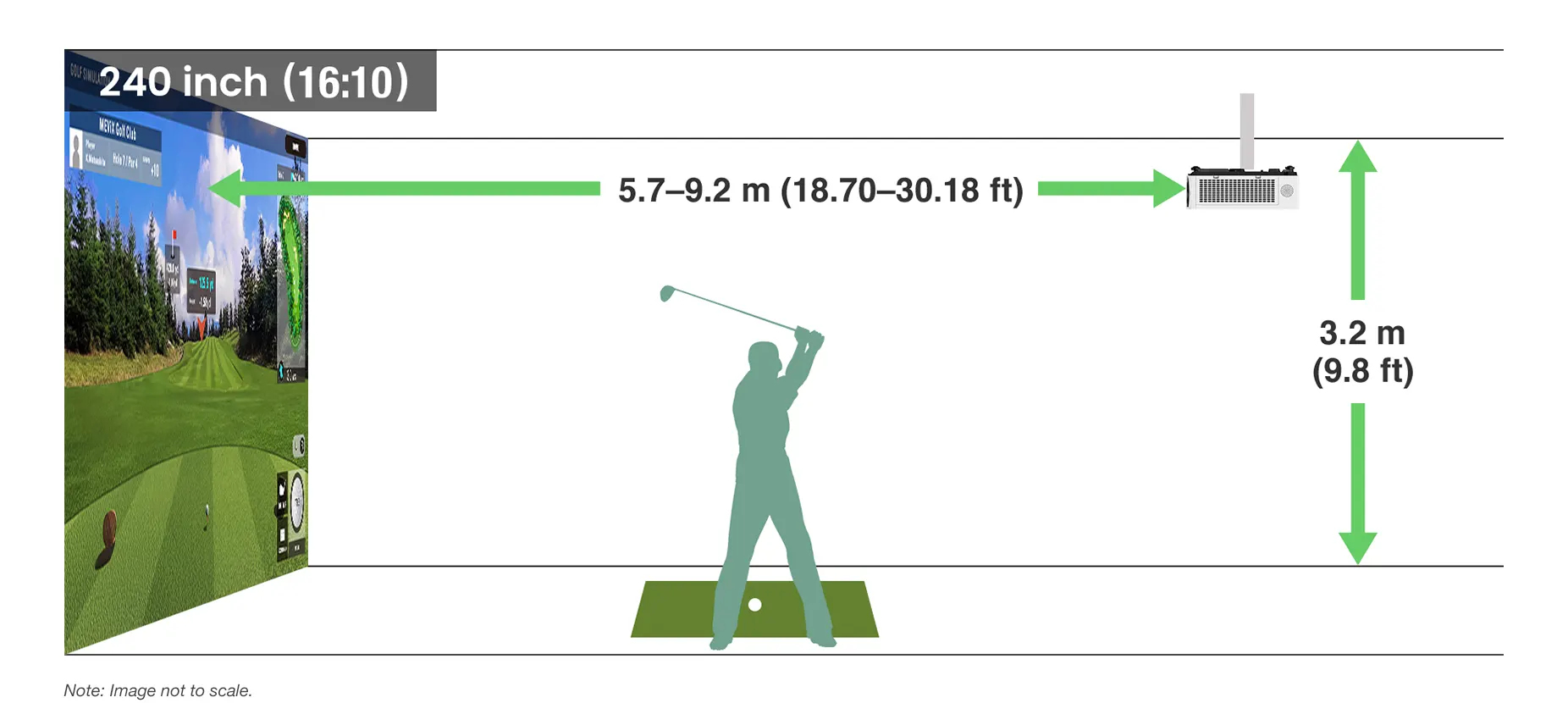
Optimized for Golf Simulation
Designed with golf simulation in mind, the series supports screen sizes up to 300 inches and can produce a 240-inch image from just 5.7 m (18.70 ft)—ideal for typical sim bays with 3.2 m (9.8 ft) ceilings. A range of mounting options, along with a single-cable HDBaseT™-based 4K DIGITAL LINK connection, streamlines installation, integration, and control in large venues.
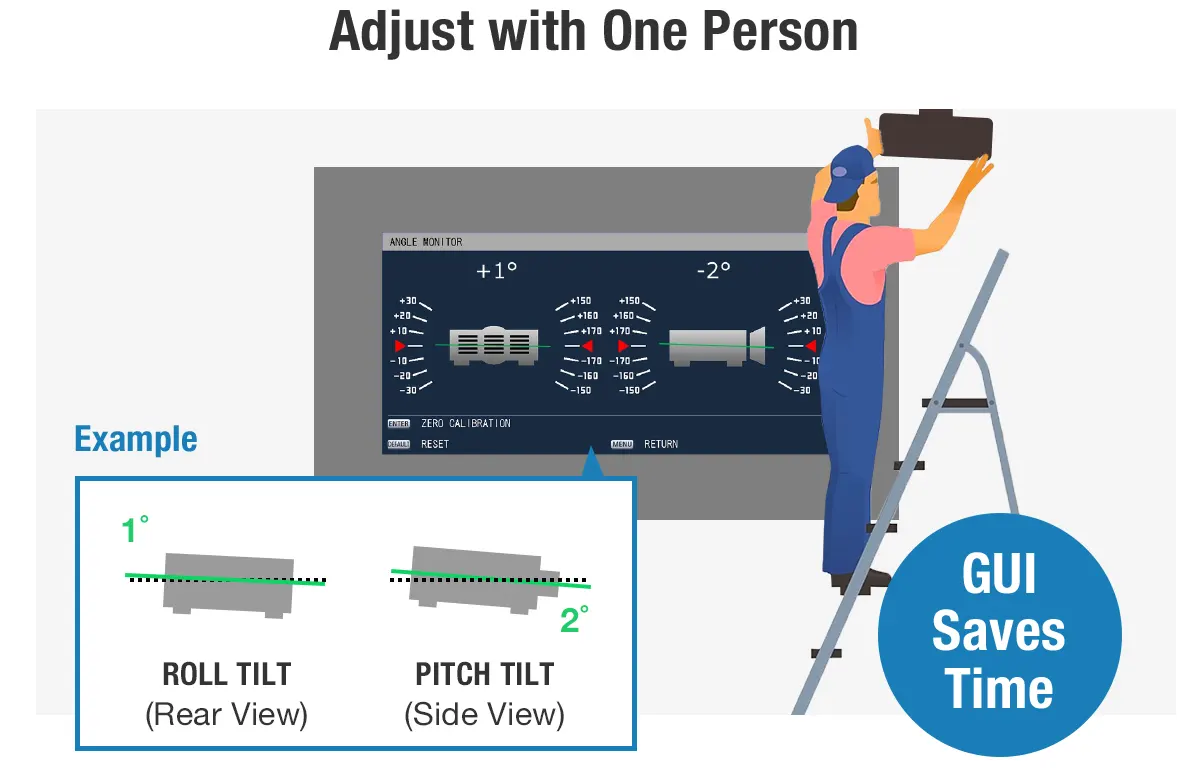
Resource-Friendly Adjustment with Angle Monitor
A built-in sensor detects changes in the projector’s pitch and roll angles and graphically displays them in the projector’s OSD settings menu. Technicians can view the info on screen and adjust the projection angle without needing assistance.
Note: The displayed values are based on the results of angle sensor detection and may differ from the actual projection angle. They are for reference only, and accuracy is not guaranteed.
Enhanced Screen Adjustment Suite
The projector’s Screen Adjustment suite features an updated graphical user interface (GUI) offering more intuitive operation. Designed to simplify setup in a wide range of spaces, it enables precise adjustments via remote control without needing a PC.
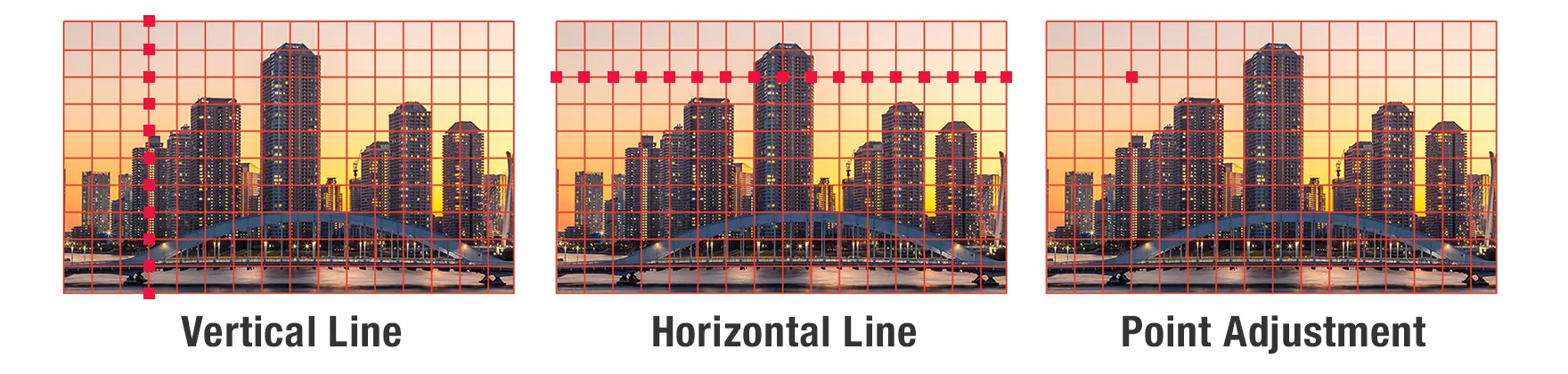
Line and Point Adjustment via Grid Function
A grid function enables correction of minor distortion by adjusting horizontal or vertical lines, or any specific point on a grid from 2 x 2 up to 17 x 13. Correction is easily performed via remote control.

Improved Adjustment for Curved Screens
In addition to Horizontal and Vertical Arc adjustment, new V/H Balance controls allow each side of the image to be fine-tuned independently for greater adjustment flexibility. This enables more precise image alignment on curved screens and helps simplify setup in applications such as sports simulators, museum exhibits, and corporate displays.

6-Point Screen Adjustment System
For corner-based or column projections, the 6-Point Screen Adjustment system enables fine-tuned control over image geometry. It’s ideal for maximizing screen use in compact meeting spaces or creating striking visual installations in galleries and showrooms.

V/H Keystone Correction with 4-Corner Adjustment
4-Corner Adjustment lets users independently control each image corner when correcting trapezoidal distortion. Settings can be saved and reapplied, streamlining setup across multiple rooms or sessions.

Maintain Aspect Ratio for Natural Scaling
Maintain Aspect Ratio preserves the image’s proportions during adjustment, preventing warping or stretching. It ensures content looks natural while still allowing for edge-to-edge alignment, providing a clean, professional finish in any space.

Single-Cable 4K DIGITAL LINK Solution
4K DIGITAL LINK, based on HDBaseT™, transmits video, audio, and control signals over a single
CAT 5e cable, simplifying installation in schools, offices, and entertainment spaces.
Note: YPBPR 4:2:0 format only for 4K/60p signals input via DIGITAL LINK.
Supports Next-Generation Control Protocols
Dedicated LAN terminal and 4K DIGITAL LINK connections support the latest protocols, including IPv6, AMX® DD, PJLink™ (Class 2), Crestron Connected® V2, Crestron® XiO Cloud, and Extron XTP®. The projector also includes an emulation function to ensure compatibility with legacy management software.
Note: The optional AJ-WM50 Series Wireless Module does not support IPv6.
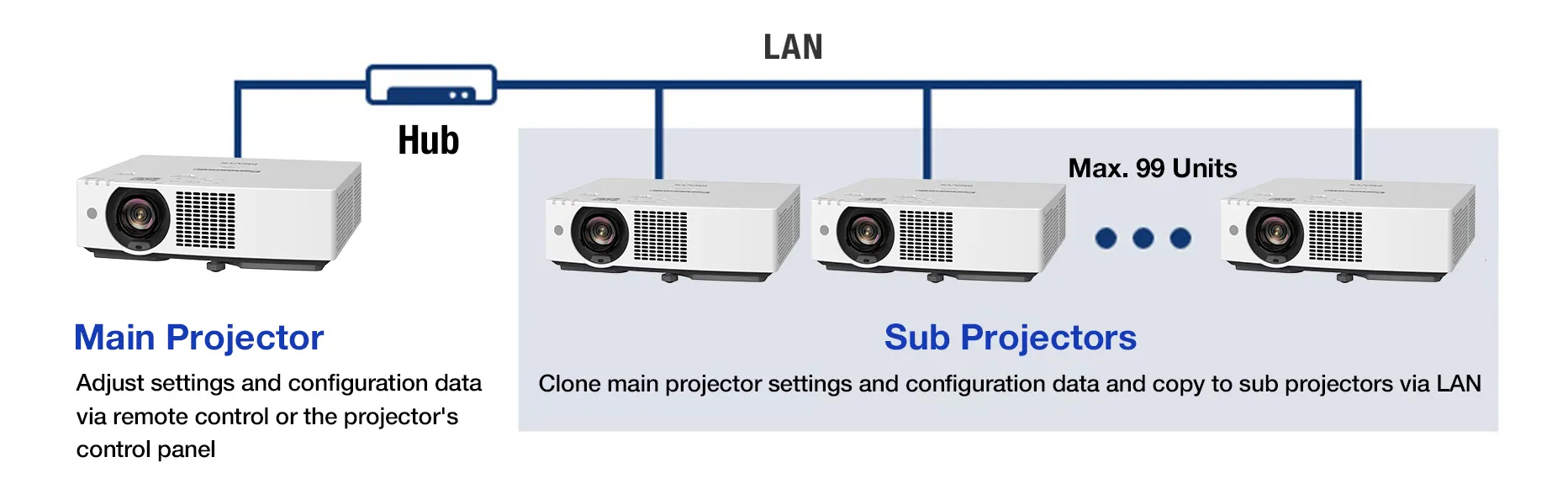
Data Cloning Function via LAN or USB Memory Devices
It can be time-consuming to adjust the same settings on each projector in your fleet. To expedite this task, the VMQ85 Series features a data cloning function that allows main projector settings, including saved adjustment data, to be copied to sub-projectors via LAN or USB device.
Note: Supported among identical models only. Excludes passwords, projector name/ID, time, date, time zone, and network settings.
CEC Command-Compatible HDMI™ Inputs and HDMI™ Output
CEC command-compatible HDMI™ inputs support linked power and playback control with compatible source devices, simplifying day-to-day operation. Auto Input Search automatically selects active input signals, reducing manual switching. An HDMI™ output is included to simplify signal distribution for multi-display installations and integrated AV environments.
Note: HDMI™ output is incompatible with CEC. Depending on the connected CEC command-compatible device, the link control may not operate normally.
Web API Support
Web API enables seamless integration with proprietary and third-party management and automation systems, supporting centralized projector control, configuration, status monitoring, and automated workflows across diverse AV environments. For more information, visit the What Is Web API? webpage here.

Control
Power on/standby, change test patterns, adjust lens shift, focus, and zoom

Setting
Configure operating mode, set clock, perform firmware updates

Status
View error reports, temperature readings, and fan rotation speed

Works with Wireless Presentation System PressIT
Share your device screen wirelessly and switch presenters freely. PressIT, Panasonic’s optional Wireless Presentation System, supports screen-sharing at the press of a button. PressIT comprises transmitters connected to your devices and a receiver connected to the projector. Learn more about PressIT here or visit our Wireless Solutions webpage.
Note: Wireless Presentation System PressIT is sold separately. Availability may vary by country or region. USB Type-C terminal of the video output device requires support for DisplayPort™ ALT Mode (video output function) and power supply function (5 V/0.9 A). PressIT app (available free from the App Store or the Google Play store) is required when using Android™ or iOS/iPadOS devices. For more details, please refer to the operating manual.

Lens Block Detection Protects Your Investment
An integrated infrared sensor detects obstructions in front of the lens and automatically reduces light output to prevent overheating and damage to the lens. A warning message is displayed on screen, and normal operation resumes once the obstruction is removed.
Works with Multi Monitoring & Control Software
Multi Monitoring & Control Software manages up to 2,048 display devices from a PC over LAN. The software facilitates status monitoring, device control, playlist delivery, playback scheduling, and system map visualization. For more information, please visit our software information webpage.
Energy-Efficient, Eco-Conscious Design
Specifications of PT-VMQ85
Specifications table
| Projector type | LCD projectors |
|---|---|
| Display method | Transparent LCD panel (x 3, R/G/B) |
| Display Device -> Panel size | 0.64 inch (16:10 aspect ratio) |
| Display Device -> Drive method | Active matrix method |
| Display Device -> Number of pixels | 2,304,000 (1920 x 1200) pixels |
| Light source | Laser diodes |
| Light output *1 *2 | 8,000 lm |
| Light output (ANSI) *1 *3 | 8,000 lm |










Share page
Share this link via:
X
LinkedIn
Xing
Facebook
Or copy link: